
Overview
By default, BGP advertises all routes learned from BGP neighbors to its other neighbors. This can cause some undesirable behavior. In this lab we will use Route Filtering to gain better control over which routes BGP advertises to which neighbors.
This is the third lab in my series on BGP Policy. We’ll be picking up where we left off in BGP Policy – Configuring AS_PATH Prepending on IOS XRd.
Scenario
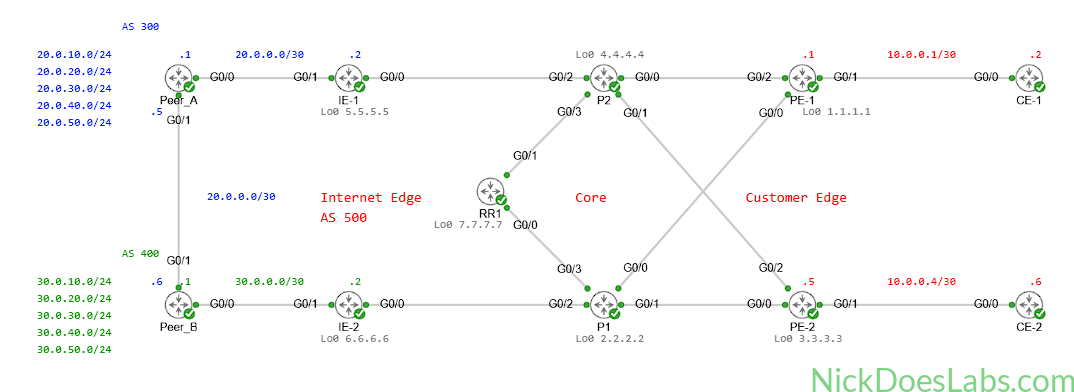
Our ISP peers with Peer_A and Peer_B. We have settlement-free peering with Peer_A so we do not charge each other for incoming or outgoing traffic. However, Peer_B charges us a premium for sending and receiving traffic. In previous labs we used local preference and AS_PATH prepending to prefer Peer_A for our incoming and outgoing traffic. However, if the peering link between Peer_A and Peer_B fails, they will begin sending traffic through our network to reach each other. This results in us being charged by Peer_B as well as additional load on our IE routers which we do not want.
Method
To prevent Peer_A and Peer_B from sending traffic to each other through our network we will use Route Filtering. Route filtering will allow us to restrict the routes that IE-1 and IE-2 advertise to Peer_A and Peer_B. We will only advertise the routes to our customer networks, 10.0.0.0/30 and 10.0.0.4/30. We will not advertise routes learned from one eBGP peer to another eBGP peer. To do this we will create a prefix set to match our customer prefixes and then create a route policy based on that prefix set. We will apply that route policy outbound on our eBGP neighborships to control which routes we are advertising to our neighbors.
Equipment
I’ll be using the topology from the previous lab BGP Policy – Configuring AS_PATH Prepending on IOS XRd. You can download the lab.yaml as well as the individual configuration files here.
- Customer Edge Routers (IOSv)
- CE-1
- CE-2
- Provider Edge Routers (XRd)
- PE-1
- PE-2
- Provider Core Routers (XRd)
- P1
- P2
- Internet Edge Routers (XRd)
- IE-1
- IE-2
- Peer ISP Routers (XRd)
- Peer_A
- Peer_B
Prequel – How Traffic Flows Without Route Filtering
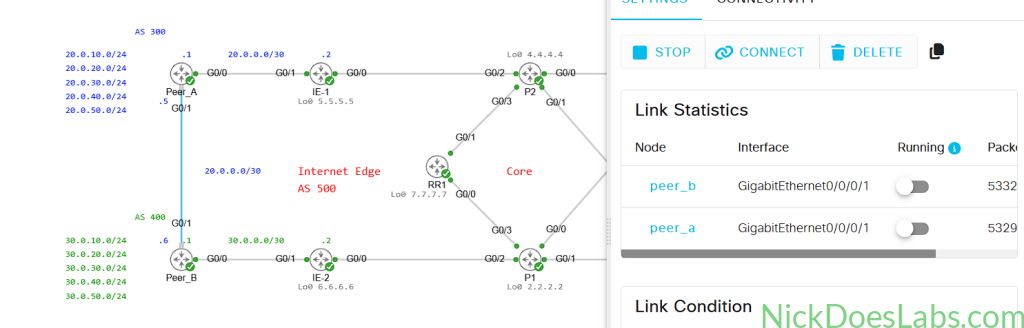
To demonstrate the issue with our current configuration, I’m going to disconnect the link between Peer_A and Peer_B to simulate a failure.
Next, I will run traceroutes from Peer_A to Peer_B and vice versa.
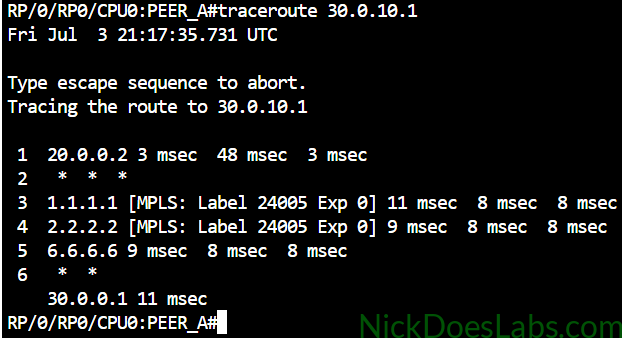
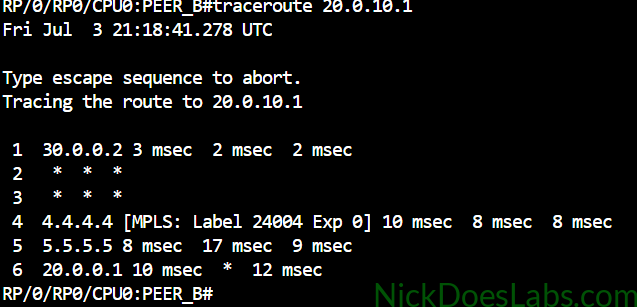
As you can see, both peers are sending traffic to each other through our Core and IE routers. To further demonstrate the issue, I will run the command show bgp ipv4 unicast 30.0.10.1 on Peer_A.
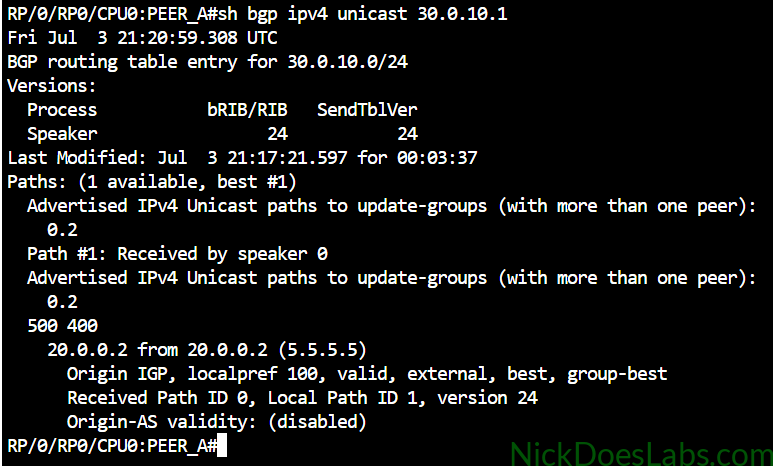
As you can see, the problem is that IE-1 (20.0.0.2) is advertising routes to Peer_B’s network. Let’s go ahead and fix this using route filtering.
Step 1 – Creating the Prefix Set for Route Filtering
First we need to create a prefix set on both of our IE routers. A prefix-set is similar to a prefix-list on IOS XE, except it is specifically made for IOS XR’s route policies which we will discuss later. The prefix set needs to contain all of the route prefixes that we want to advertise to the internet. We will create prefix sets on IOS XRd using the command prefix-set [name] to enter prefix set configuration mode.
The full configuration for the prefix set on both IE routers is as follows:
prefix-set CUSTOMER_ROUTES
  10.0.0.0/30, 10.0.0.4/30
  exit
commit
To confirm our configuration we can run the verification command show rpl prefix-set CUSTOMER_ROUTES.
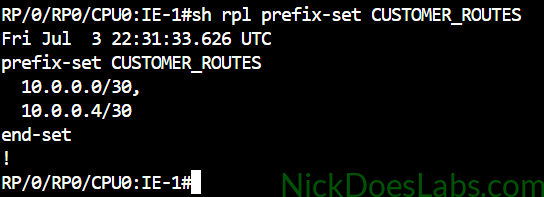
With our prefix set created we can now create a route policy based on it.
Step 2 – Creating the Route Policy for Route Filtering
On IOS XR, instead of route maps we use Route Policies to configure route filtering. Route Policies are written in Route Policy Language (RPL), a policy language that gives us much greater control over routing policy. A full reference of RPL commands and syntax can be found on Cisco’s documentation site: Routing Policy Language Commands on Cisco IOS XR Software.
To enter route policy configuration mode we will use the command route-policy [policy name]. Inside the route policy we are going to use the command destination in to filter routes based on the destination prefix. This is similar to configuring a route-map on IOS/IOS XE where we would match a prefix-list.
The complete configuration for the route policy on both IE routers is as follows:
route-policy ADVERTISE_CUSTOMER_ROUTES
  if destination in CUSTOMER_ROUTES then
    pass
  else
    drop
    endif
  end-policy
commit
This conditional logic tells IOS XR to allow (pass) routes that match the CUSTOMER_ROUTES prefix set and deny (drop) them if they don’t.
With our route policy created on both IE routers, we can go ahead and apply it to our eBGP neighborships
Step 3 – Applying the Route Policy for Route Filtering
On both IE routers we will use the command router bgp 500 to enter BGP configuration mode. We will then enter the neighbor configuration mode for the appropriate peer with the command neighbor [ip address]. Finally we will enter address family configuration mode for that neighbor using address-family ipv4 unicast. This is where we will apply our route policy with the command route-policy [policy name] out.
If you are using my configurations / lab files we also need to remove the PASS_ALL policy from the neighborships.
!!! on IE-1 !!!
router bgp 500
  neighbor 20.0.0.1
    address-family ipv4 unicast
      no route-policy PASS_ALL out
      route-policy ADVERTISE_CUSTOMER_ROUTES out
      commit
!!! on IE-2 !!!
router bgp 500
neighbor 30.0.0.1
address-family ipv4 unicast
no route-policy PASS_ALL out
route-policy ADVERTISE_CUSTOMER_ROUTES out
commitWith our route filtering policy applied, we can now verify that it is working.
Step 4 – Verifying Route Filtering
To verify our configuration, I will repeat the traceroutes from earlier on both peer routers. The link between Peer_A and Peer_B is still disabled in Cisco Modeling Labs.
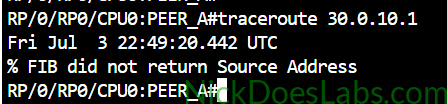
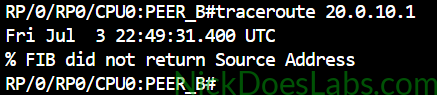
Both traceroutes fail with the error FIB did not return Source Address. This is IOS XR’s way of telling us that it has no route to the destination. If I run show route bgp on both peer routers I will see that they only have routes to our customer prefixes.
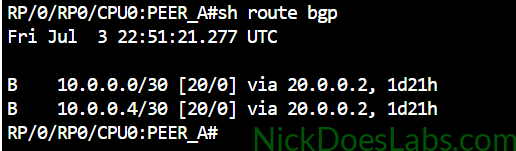
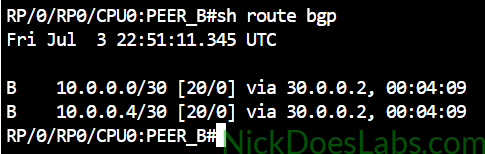
We can also confirm which prefixes we are advertising to neighbors on our IE routers. To do this we will use the command show bgp advertised neighbor [neighbor ip] summary.
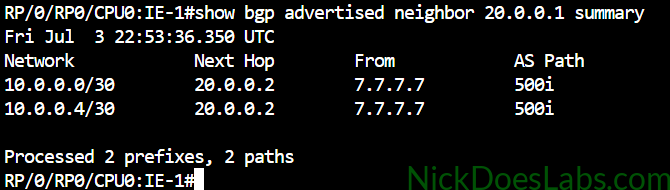
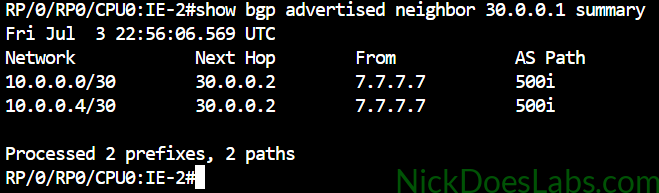
This also confirms that we are only advertising our customer prefixes and not routes to our peers.
Conclusion
We have successfully used prefix sets and route policies to implement route filtering on IOS XR. This prevents our eBGP peers from sending traffic to each other through our network. By extension, this allows us to avoid incurring charges from Peer_B for traffic that doesn’t belong to our customers. This also allows us to reduce the load on our IE and Core routers by ensuring they are only transporting traffic that belongs to our customers.
You can download the completed configuration files and lab.yaml file here: BGP_Route_Filtering.