Overview
In the previous lab we configured QoS classification and marking in a Layer 3 MPLS VPN. We classified voice, SIP signaling, video, and best-effort traffic and marked it with the appropriate DSCP values. However, marking traffic does not change how the network treats it by itself. In this lab we will use those markings to configure congestion management and congestion avoidance in the MPLS core. We will create congestion on a provider link and configure queuing so that delay-sensitive traffic is prioritized when the link becomes overwhelmed. We will then configure Weighted Random Early Detection (WRED) to begin dropping lower-priority traffic before the queues become completely full.
Scenario
Customer A and Customer B are Layer 3 VPN customers connected to our network. Both customers send VOIP traffic through the Layer 3 VPN, while Customer B also sends real time video for their security cameras. In the previous lab we marked VOIP traffic as DSCP EF, SIP signaling as CS3, Customer B’s video traffic as AF41, and all remaining traffic as best effort. We now need to make sure those markings have an effect when congestion occurs in the provider network. Voice should receive the highest priority because it is sensitive to delay and jitter. SIP signaling and video should receive guaranteed bandwidth, while best-effort traffic should use the bandwidth that remains.
Method
We will use a traffic shaping policy to limit the provider links to 500 kbps. This will give us a predictable bottleneck that we can overwhelm with traffic generated by the customer desktops. We will first generate more than 500 kbps of traffic without an outbound QoS policy so we can observe how the network behaves during congestion. We will then configure Low Latency Queuing (LLQ) for EF voice traffic and Class-Based Weighted Fair Queuing (CBWFQ) for the remaining traffic classes. After verifying the queuing behavior, we will add WRED for congestion avoidance and compare the results.
Equipment
I’ll be continuing with the topology built in the previous lab QoS Classification and Marking in a Layer 3 MPLS VPN. That topology can be downloaded here. The existing classification and marking configurations will remain in place so this lab can focus entirely on congestion management and congestion avoidance.
- Customer Edge Routers (IOSv)
- CE-1A
- CE-1B
- CE-2A
- CE-2B
- Provider Edge Routers (CSR1000v)
- PE-1
- PE-2
- Provider Core Routers (CSR1000v)
- P1
- P2
- Customer Desktops (Desktop)
- CD-1A
- CD-1B
- CD-2A
- CD-2B
Step 1 – Configuring the Congested Core Link
This is where I ran into my first “learn the hard way” moment in this lab. I initially tried to simulate link congestion by using Cisco Modeling Lab’s “Link Condition” dialog to limit the link to 500 kbps:
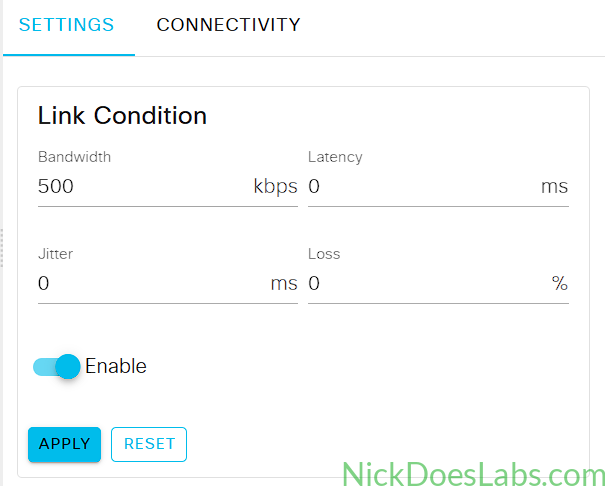
After hours of different iPerf tests, tweaking parameters, and research, I realized this didn’t work the way I thought it would. Cisco Modeling Labs simulates the link conditioning after the traffic leaves the router’s interface. Therefore the router never sees the congestion, so there is no way for our policies to affect it.
Instead, I settled on simulating congestion by using a traffic shaping policy on the interface. The following policy rate-limits the interface to a bandwidth of 500kbps:
policy-map shaper
  class class-default
    shape average 500000
interface gi1
  service-policy output shaper
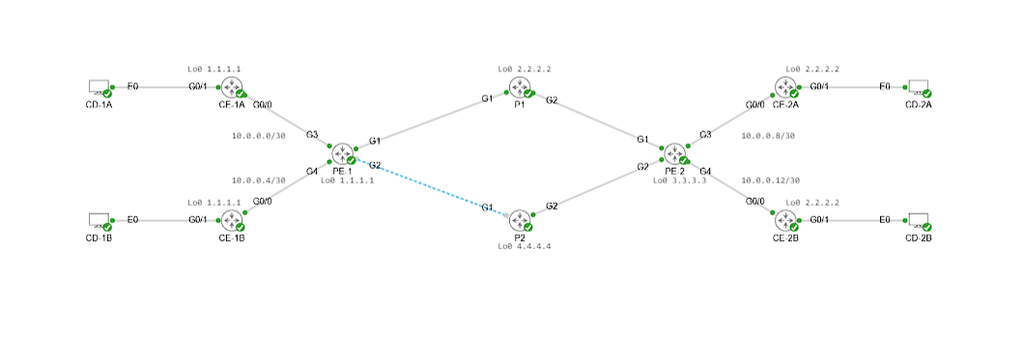
To ensure that all traffic was using the same outbound interface on PE-1 (G1), I shut down G2:
Next, let’s see how this affects traffic with no congestion management.
Step 2 – Generating and Verifying Congestion Without QoS
Between Customer A’s PCs I will send a data stream with no DSCP marking, to simulate regular data.
!!! on CD-1A !!!
iperf -c 192.168.2.2 -p 15000 -u -b 700k -t 60 -l 1200 -i 1

!!! on CD-2A !!!
iperf -s -u -p 15000 -i 1
These commands set up a 1-minute 700 kbps stream of UDP packets from CD-1A to CD-2A on port 15,000. I chose port 15,000 to ensure that the traffic doesn’t match the VOIP class-map and get marked as EF.
At the same time, I’ll run similar commands on Customer B’s devices. This time I’ll mark the packets as DSCP EF (46) to simulate high priority traffic and I’ll send a 100 kbps stream.
!!! on CD-1B !!!
iperf -c 192.168.4.2 -p 17000 -u -b 100k -t 60 -l 1200 -i1 --dscp 46

!!! on CD-2B !!!
iperf -s -u -p 17000 -i 1
Then, I’ll verify the performance of the two streams on CD-2A and CD-2B:
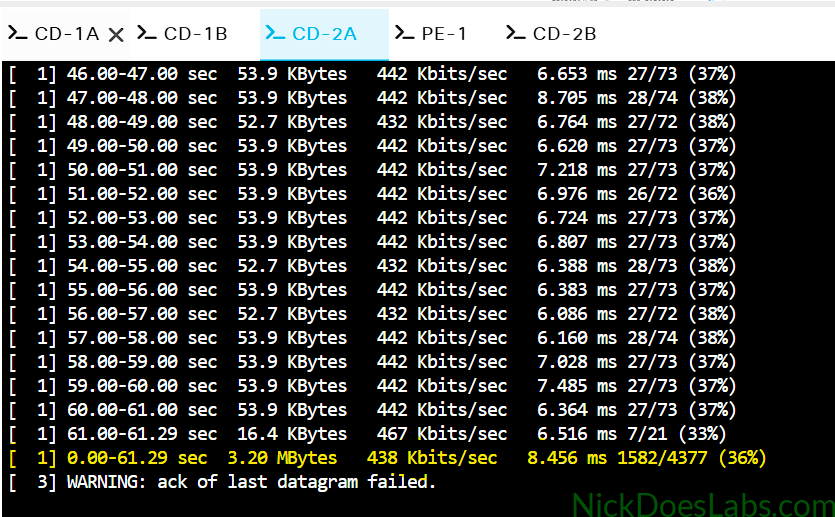
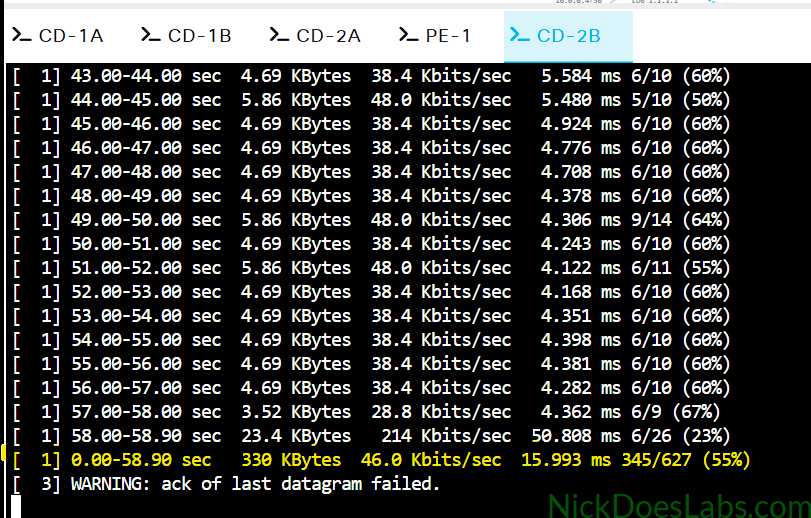
Here we see the performance is poor for both traffic streams. The network is dividing the available 500 kbps randomly for both traffic streams even though Customer B’s traffic should be given priority. We see high packet loss, high jitter, and low bandwidth for both streams.
Interestingly, Customer B’s stream suffered higher packet loss overall even though they were transmitting less data. Customer B experienced 55% of packets lost compared to 36% for Customer A.
In order to ensure that resources are divided appropriately based on QoS markings, we need to configure Congestion Management.
Step 3 – Configuring Congestion Management with LLQ and CBWFQ
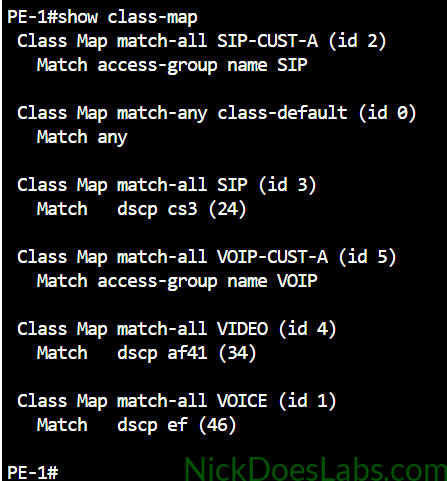
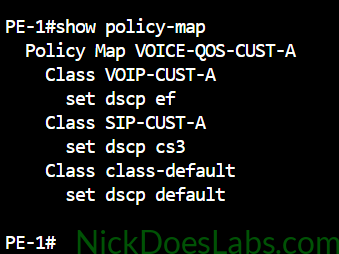
To recap, from the QoS Classification and Marking in a Layer 3 MPLS VPN lab we currently have the following class-maps and policy maps:
At this point, I ran into another “learn the hard way” moment. When creating the congestion management policy map we need to apply it to the output of PE-1’s Gi1 port. At that point, the packets have already been encapsulated with MPLS labels, so the router is actually looking at the MPLS EXP field for QoS markings. Therefore, instead of matching the dscp fields we need to match the corresponding exp bits.
To correctly configure the voice, video and SIP class maps, I made the following changes:
class-map VOICE
  no match dscp ef
  match mpls exp 5
class-map VIDEO
  no match dscp af41
  match mpls exp 4
class-map SIP
  no match dscp cs3
  match mpls exp 3
This gave me the following class maps:
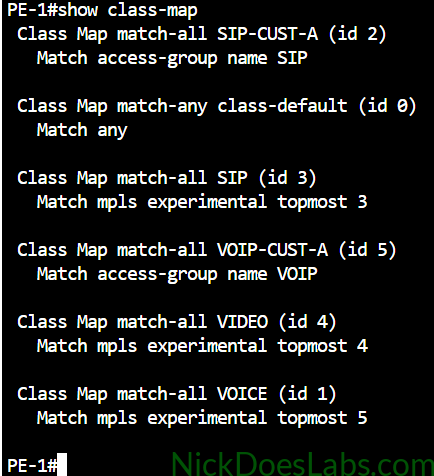
We are matching Customer A’s traffic based on access-groups since we don’t trust their markings. Then, we are using policy-maps to mark that traffic appropriately. The three marked classes are SIP (CS3), VOICE (EF), and VIDEO (AF41). These markings map to MPLS EXP values 3, 5, and 4, respectively. Other traffic remains in the default class.
To implement Class-Based Weighted Fair Queuing (CBWFQ) we need to create another policy map. In this policy map we will assign bandwidth percentages for each class. We can do this with the bandwidth percent command. These percentages guarantee a certain amount of bandwidth to be allocated to each traffic class.
For our VOICE class we also want to implement Low Latency Queuing (LLQ). LLQ is a priority queue which is designed to minimize latency and jitter for delay-sensitive traffic. Traffic in the LLQ will always be handled before the other queues. To assign a class to the LLQ we use the priority percent command instead of bandwidth percent.
Putting this all together, the commands to implement congestion management on PE-1 are as follows:
policy-map CONGESTION-MGMT

class VOICE
  priority percent 20

class VIDEO
  bandwidth percent 30

class SIP
  bandwidth percent 5

class class-default
  fair-queue
The key to understanding this policy map is that voice is more delay-sensitive, so it gets higher scheduling priority (LLQ). On the other hand, video requires more capacity, so it gets a larger bandwidth reservation. SIP is important enough to get its own guaranteed bandwidth, however it doesn’t require that much so we are giving it 5%.
Remember that we have our shaper policy applied to reduce our bitrate to 500 kbps on interface Gi1. Since only one output service policy can be applied at a time, we will add our congestion management policy as a child to our shaper policy.
To do this we make the following configuration change:
policy-map shaper
  class class-default
    service-policy CONGESTION-MGMT
Next, let’s see how this policy map changes our network performance tests.
Step 4 – Verifying Congestion Management
I’m going to run the same test in iPerf that I ran earlier. I’ll run a 1-minute 700 kbps stream of UDP packets from CD-1A to CD-2A on port 15,000. This traffic will be unmarked, falling in the default queue. At the same time I’ll run a 1-minute 100 kbps stream of UDP traffic marked as dscp 46 (ef / VOICE) from CD-1B to CD-2B.
We should see that the stream on Customer B’s PCs gets better results since it is simulating voice traffic.
!!! on CD-1A !!!
iperf -c 192.168.2.2 -p 15000 -u -b 700k -t 60 -l 1200 -i 1

!!! on CD-2A !!!
iperf -s -u -p 15000 -i 1

!!! on CD-1B !!!
iperf -c 192.168.4.2 -p 17000 -u -b 100k -t 60 -l 1200 -i1 --dscp 46

!!! on CD-2B !!!
iperf -s -u -p 17000 -i 1
Let’s check the results on CD-1B and CD-2B:
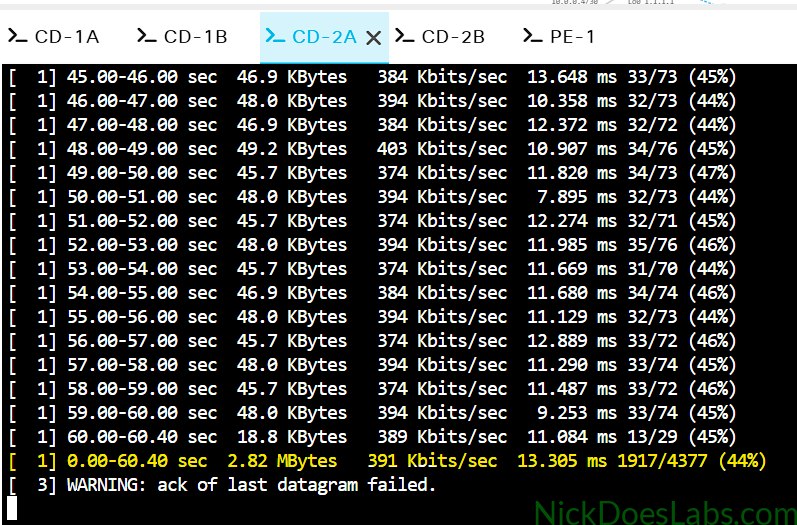
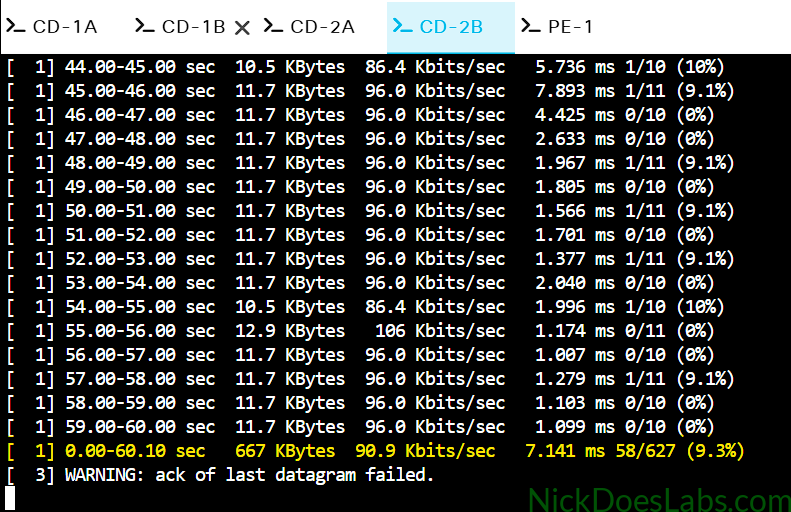
As you can see, both streams took losses which is to be expected with this much congestion. However, Customer A’s best effort traffic lost a catastrophic 44% of packets, whereas Customer B’s voice traffic only lost 9.3%. We can also see that Customer B’s traffic experienced significantly less jitter (7.141ms) compared to Customer A (13.305ms) on average.
These results indicate that the CBWFQ and LLQ policies improved the performance of the voice-marked traffic, although it still experienced 9.3% packet loss. Next, we’ll look at congestion avoidance.
Step 5 – Configuring Congestion Avoidance with CBWRED
Congestion avoidance attempts to reduce congestion by random early dropping (RED) of packets. RED works best on TCP streams, since TCP will detect the dropped packets and slow down its transmission rate in response. This results in less traffic flooding the router. Class-Based Weighted Random Early Detection is a type of RED which is applied alongside CBWFQ. Different traffic classes can have different rules, meaning they can be dropped more or less aggressively.
First, let’s remove fair-queuing from the default class to eliminate the 16 packet maximum:
policy-map CONGESTION-MGMT
  class class-default
    no fair-queue
Then, let’s generate some TCP traffic with iPerf to see how congestion occurs without CBWRED:
!!! On CD-1A !!!
iperf -c 192.168.2.2 -P 4 -t 60 -i 5

!!! On CD-2A !!!
iperf -s
These commands will generate four TCP streams between CD-1A and CD-2A for one minute. By default the streams will attempt to send as much bandwidth as possible through the network.
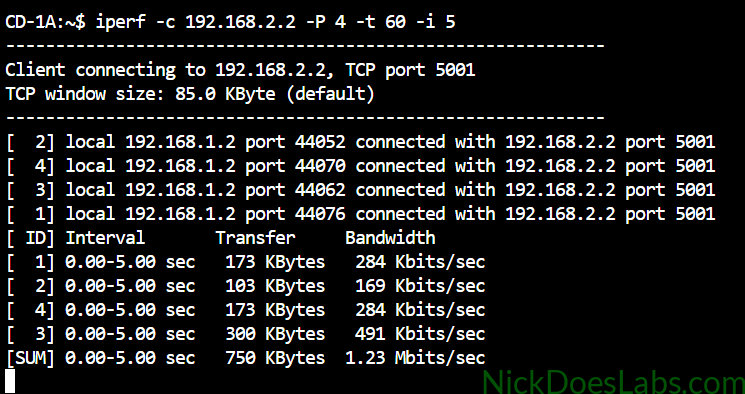
Once this completes, we can check the interface statistics on PE-1 with the command show policy-map int gi1:
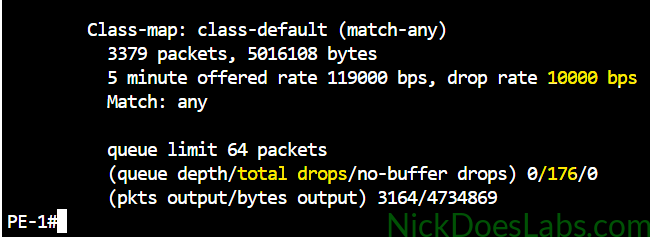
Since these are generic TCP streams they fall under our default class. Here we see that they experienced 176 drops, and a drop rate of 10000 bps.
Next, let’s configure CBWRED. To do this, we need to modify the CONGESTION-MGMT policy map and add the command random-detect to the classes we want WRED to work on. I’m just going to apply this to the default class, but this could be fine tuned based on the needs of the network.
The commands to implement CBWRED are below.
policy-map CONGESTION-MGMT
  class class-default
    random-detect
    no fair-queue
After adding random-detect to the default class, I’ll clear the interface counters with the command clear counters gi1. Then, I’ll run the iPerf test again and check the interface counters once it completes.
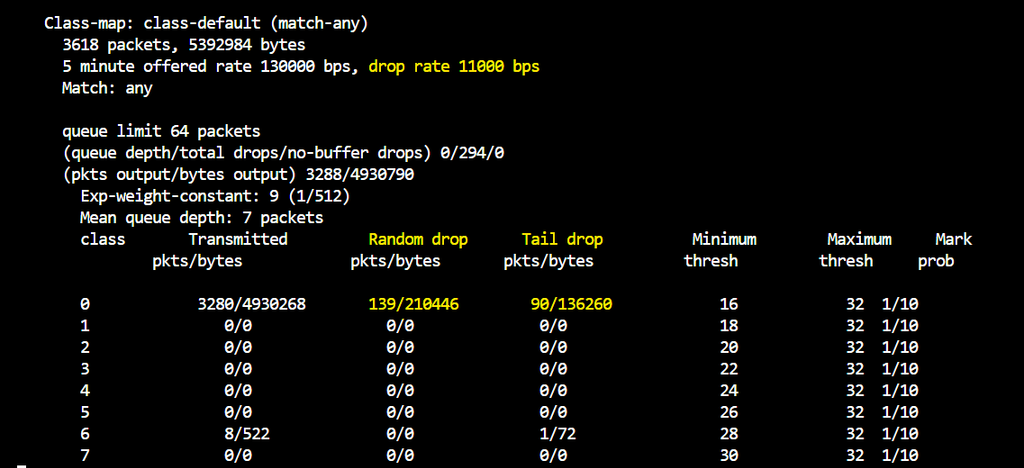
With WRED disabled, the router recorded 176 packet drops. After enabling WRED, the reported total was 294 drops, while the listed counters show 139 random drops and 90 tail drops. Those two counters add up to 229, so the remaining 65 drops are not accounted for by the figures shown here. The counters demonstrate random early drops alongside tail drops, but they do not establish that TCP senders reacted earlier or that overall packet loss decreased.
Conclusion
In this lab we successfully configured congestion management and congestion avoidance in the Cisco CSR1000v node in Cisco Modeling Labs. We used iPerf to verify how traffic was treated before and after implementing congestion management and congestion avoidance. Before implementing congestion management, QoS markings were ignored and voice traffic was treated the same as regular traffic. After implementing congestion management, the voice-marked traffic received priority and showed improved results, although it still experienced 9.3% packet loss. Before implementing congestion avoidance, packets were dropped when the queue reached its limit. After enabling WRED, the router recorded random early drops alongside tail drops; the results did not demonstrate an overall reduction in packet loss.
The completed lab.yaml and router configuration files are available here: L3VPN_QoS_Congestion.