
Overview
In this lab we will configure BGP local preference on our IOS XRd Internet Edge routers in Cisco Modeling Labs. Our goal will be to manipulate traffic to prefer Peer_A over Peer_B. BGP local preference is an attribute that allows engineers to manipulate the path that traffic follows out of our network. We use local preference when we want traffic to use a different path than the default best path selected by BGP. This is usually done for cost reasons and that will be the basis of this lab scenario. Other reasons to manipulate BGP policy include bandwidth or security.
Scenario
Our ISP peers with Peer_A and Peer_B. We have settlement-free peering with Peer_A so we do not charge each other for incoming or outgoing traffic. However, Peer_B charges us a premium for sending and receiving traffic. Our goal is to have all traffic from our customers go through Peer_A, even if Peer_B is the fastest route. If Peer_A fails, traffic will automatically fail over to use Peer_B.
Method
We will apply a BGP local preference of 200 on IE-1 for Peer_A. Since that is greater than the default local preference of 100, routes learned from Peer_A will be installed in the routing table. IE-1 will share this local preference with the rest of our network via iBGP. This will result in all traffic flowing through Peer_A, even if it is destined for Peer_B. We will then simulate a failure of Peer_A by turning that router off. We will confirm that all traffic then flows through Peer_B.
Equipment
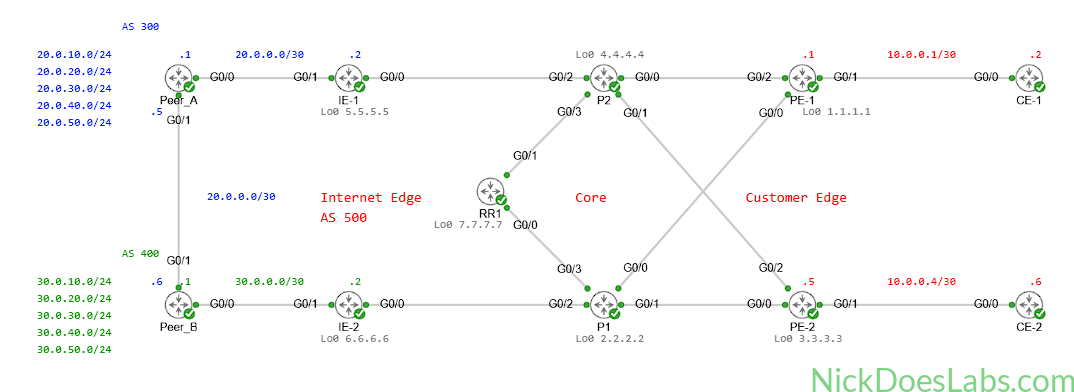
I’ll be using the topology that I built in Building an ISP eBGP Peering Lab in Cisco Modeling Labs. You can download the lab.yaml as well as the individual configuration files here.
- Customer Edge Routers (IOSv)
- CE-1
- CE-2
- Provider Edge Routers (XRd)
- PE-1
- PE-2
- Provider Core Routers (XRd)
- P1
- P2
- Internet Edge Routers (XRd)
- IE-1
- IE-2
- Peer ISP Routers (XRd)
- Peer_A
- Peer_B
Prequel – How Traffic Flows Currently
On CE-1 I am going to run a traceroute to 20.0.10.1 and 30.0.10.1. These two IP addresses originate on Peer_A and Peer_B respectively. We should see that traffic to 20.0.10.1 prefers to exit via IE-1 to Peer_A and traffic to 30.0.10.1 prefers Peer_B via IE-2.
Note: There is some sort of issue with IOS XR not sending TTL Time Exceeded packets back to my IOS XE (CE) routers. I believe this is some sort of bug, since neither I nor the three AIs that I use could find any configuration errors. Ping from CE to Peer routers works but traceroute fails on the final step. For this demonstration I’m using PE-1 to run the traceroutes.
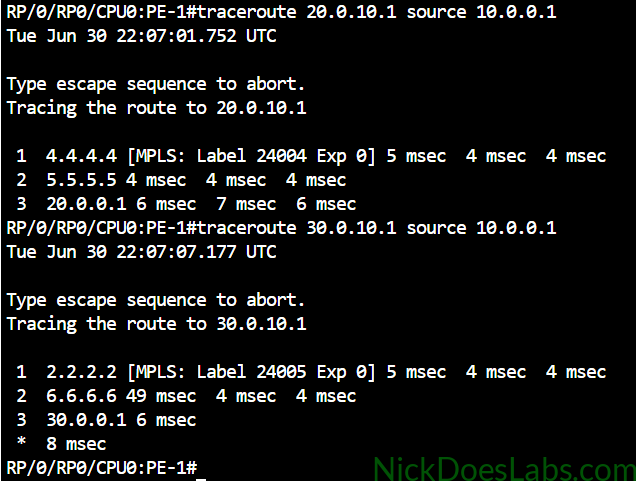
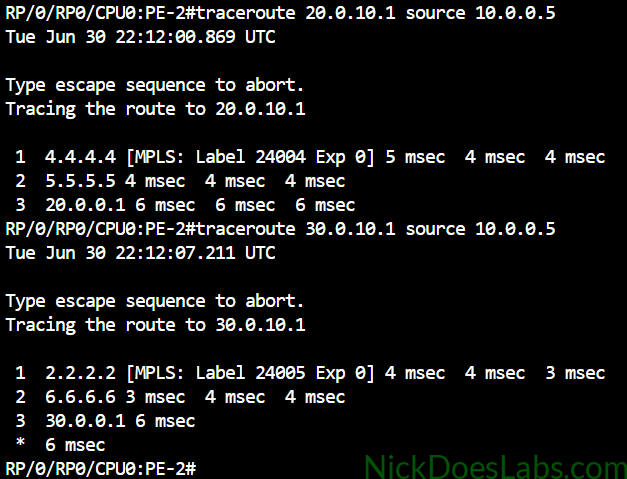
As we can see, traffic is taking the most direct route to the source of the loopback. This means that traffic to 20.0.x.x is going straight to Peer_A at 20.0.0.1 and traffic to 30.0.x.x is going straight to Peer_B at 30.0.0.1. This is the expected behavior of BGP.
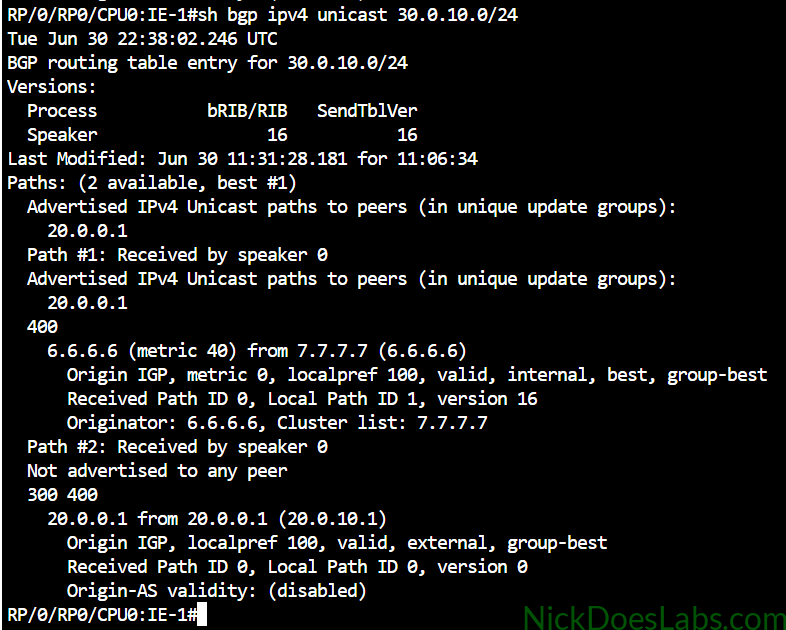
If we look at IE-1’s BGP database information for a Peer_B prefix we will see that it learns both the path through IE-2 and through Peer_A. However, IE-1 is only using the path through IE-2 because it has a shorter AS_PATH than the path through Peer_A.
Step 1 – Configuring Local Preference on IE-1
We will run the following commands on IE-1 to create a route policy and apply it to routes received from Peer_A. This route policy will set the local preference of all routes received from Peer_A to 200.
!!! Creating the Policy !!!
route-policy PREFER_PEER_A
  set local-preference 200
  pass
  exit
commit

!!! Applying the Policy !!!
router bgp 500
  neighbor 20.0.0.1
  address-family ipv4 unicast
    route-policy PREFER_PEER_A in
    commit
Since 200 is greater than the default local-preference of 100, all routes from Peer_A should be preferred over the same routes from Peer_B.
Step 2 – Verifying the Local Preference Route Policy
I will now run the same command on IE-1 that I did earlier, show bgp ipv4 unicast 30.0.10.0/24.
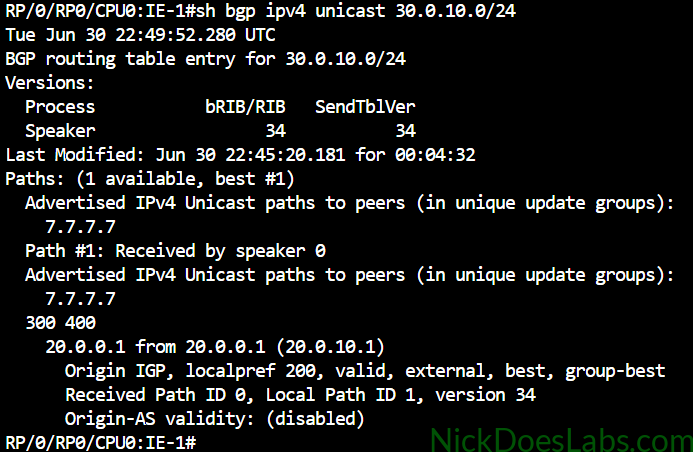
As we can see, IE-1 no longer sees the shorter path via IE-2, it only sees the path via Peer_A. This is because IE-2 is no longer sharing routes learned from Peer_B since they have a lower local-preference than routes learned from Peer_A.
We can verify this by running the same command on IE-2.
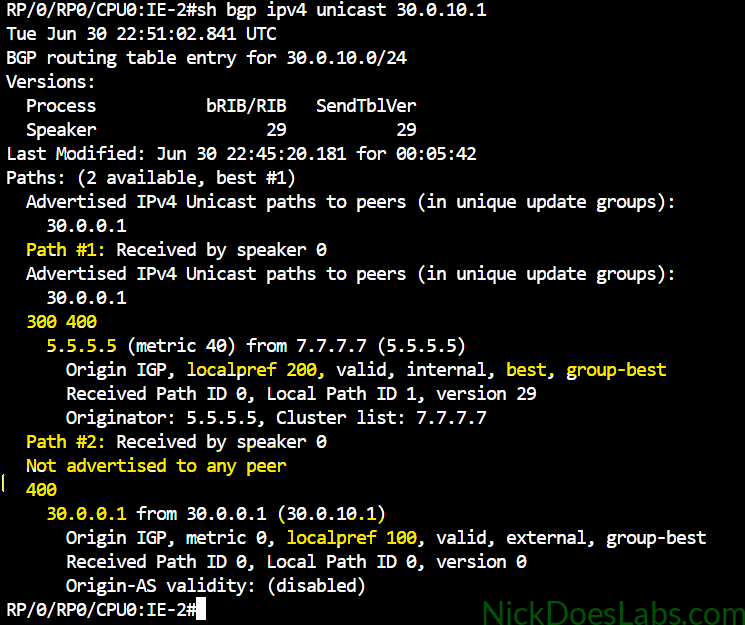
IE-2 has learned from our route reflector about IE-1’s (5.5.5.5) higher local preference path to 30.0.10.0/24 via AS 300 and 400. Because of this, it will ignore the path it learned from 30.0.0.1 and not advertise it to the route reflector.
Finally, we can verify this all with another set of traceroutes from our PE routers:
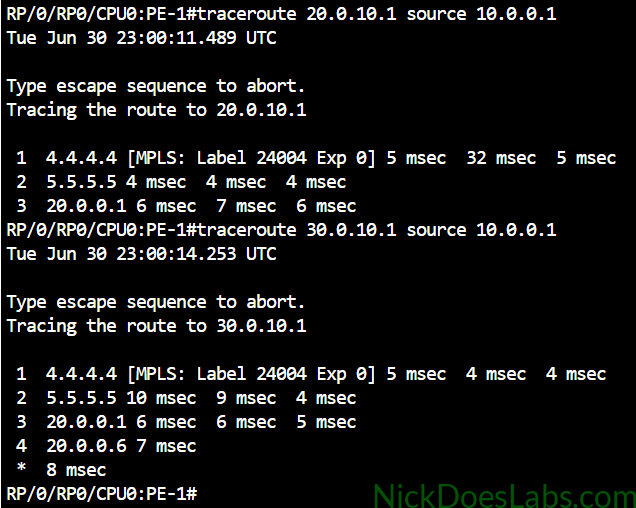
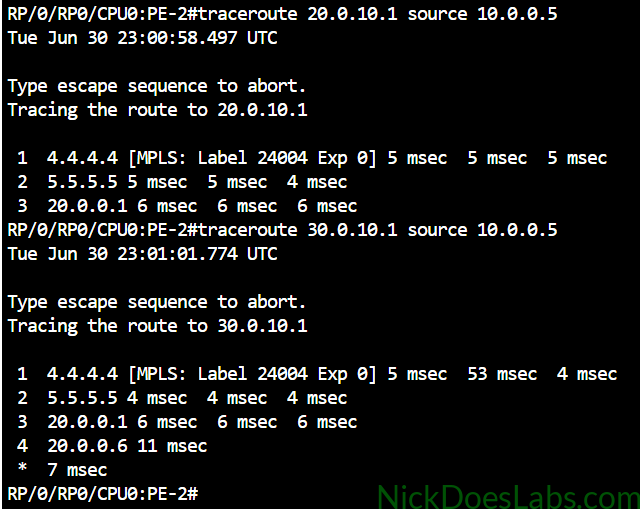
As we can see, all traffic is now flowing through Peer_A at 20.0.0.1 even if it is destined for Peer_B at 30.0.10.1.
Step 3 – Verifying Failover
We are going to confirm that if our link to Peer_A fails that traffic will flow through Peer_B instead. To simulate this I have disabled the link between IE-1 and Peer_A in Cisco Modeling Labs.
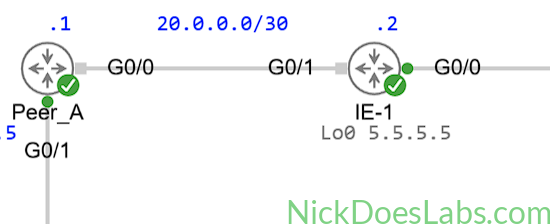
I will run the traceroutes again to verify that BGP has failed over to the redundant path. Note that Peer_A is still online and reachable but only via Peer_B.
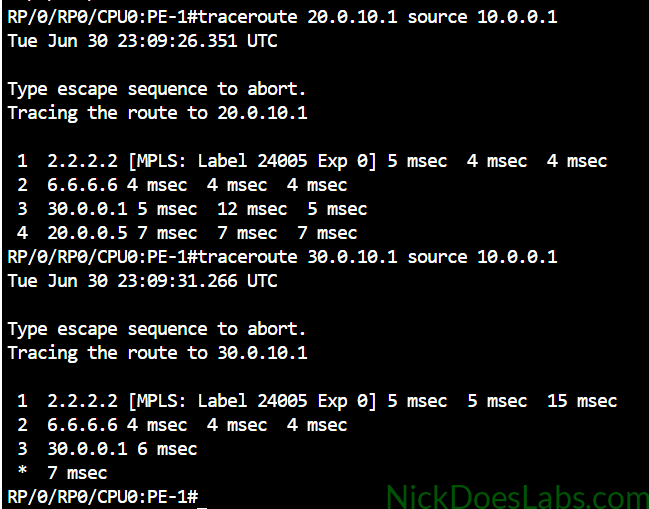
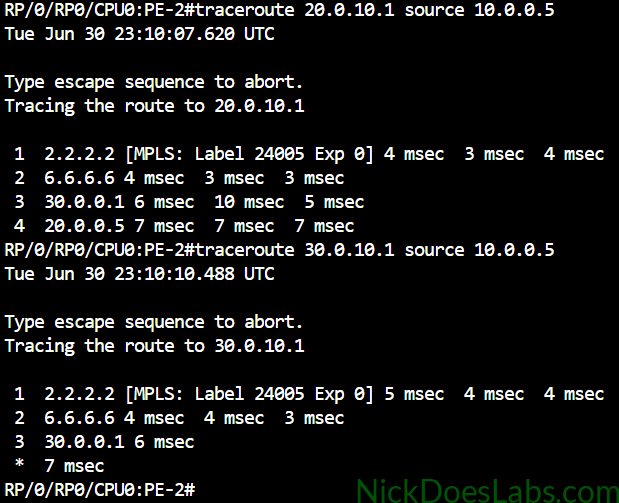
As we can see all traffic is now flowing through Peer_B at 30.0.0.1.
Conclusion
In this lab we have successfully created a route policy to set the local-preference of all routes to 200. We then applied that route policy to inbound routes on IE-1’s link to Peer_A. This effectively set the local-preference to 200 for all routes received from Peer_A. Because of this, all traffic prefers Peer_A, even if it could take a shorter path directly to Peer_B. We also simulated a failure of our link to Peer_A and observed that traffic then flows through Peer_B. This route policy allows us to take advantage of our settlement-free peering with Peer_A while still keeping Peer_B as a fail-safe.
We still have an issue here, which is that we have no control over inbound traffic. While local preference forces our outbound traffic through Peer_A, inbound traffic will use whatever path BGP thinks is best by default. In my next post on BGP policy we will use AS_PATH Prepending to force inbound traffic through Peer_A instead of Peer_B. You can read that post here: BGP Policy – Configuring AS_PATH Prepending on IOS XRd.
You can download the lab.yaml and the configurations for all routers here: BGP_Local_Preference Lab.